- Home Page /
- Electronics /
- Computer Accessories /
- Computer Accessories & Peripherals /
- Computer Cable Adapters /
- LINKUP - [Active Chip USB 3.0 (3.2 Gen 1) Int...
0 ratings






Item #:
35445719
LINKUP - [Active Chip USB 3.0 (3.2 Gen 1) Internal IDC 20 Pin Motherboard Header to A-Key (Type-E) 20 Pin Female Converter for Type C Panel Mount
Item #:
35445719
KRW 44166
Price Details
Excluding Shipping & Custom charges ( Shipping and custom charges will be calculated on checkout )
*All items will import from US
In stock
 Imported from USA store
QTY:
Only 11 items left in stock.
Order now and get it around Wednesday, June 24
Secured transaction
Ubuy works hard to protect your security and privacy. Our advanced payment security system ensures confidentiality by encrypting your information during transmission using AES (Advanced Encryption Standards) and SSL (Secure Socket Layer) protocols. Your payment details are 100% secure as we do not share your payment details with third party sellers.
Our Top Logistics Partners


Active chipset enables full USB-C features, preserves the functions of Channel Configuration pins.

Fast
Shipping

Free
Return*

Secure Packaging

100% Original Products

PCI DSS Compliance

ISO 27001 Certified


Note: Step Down Voltage Transformer required for using electronics products of US store (110-120). Recommended power converters Buy Now.


What Stands Out
Versatile Compatibility
Designed for all USB-C devices, this adapter ensures seamless connectivity with various modern electronics, making it ideal for tech enthusiasts and professionals alike.
Solid Construction
Built with durable materials, the LINKUP adapter promises longevity and reliability, withstanding everyday use without compromising performance.
Easy Installation
The simple design allows for quick and effortless installation onto a motherboard's 3.0/3.1 IDC20 header, enhancing user convenience and reducing setup time.
Product Details
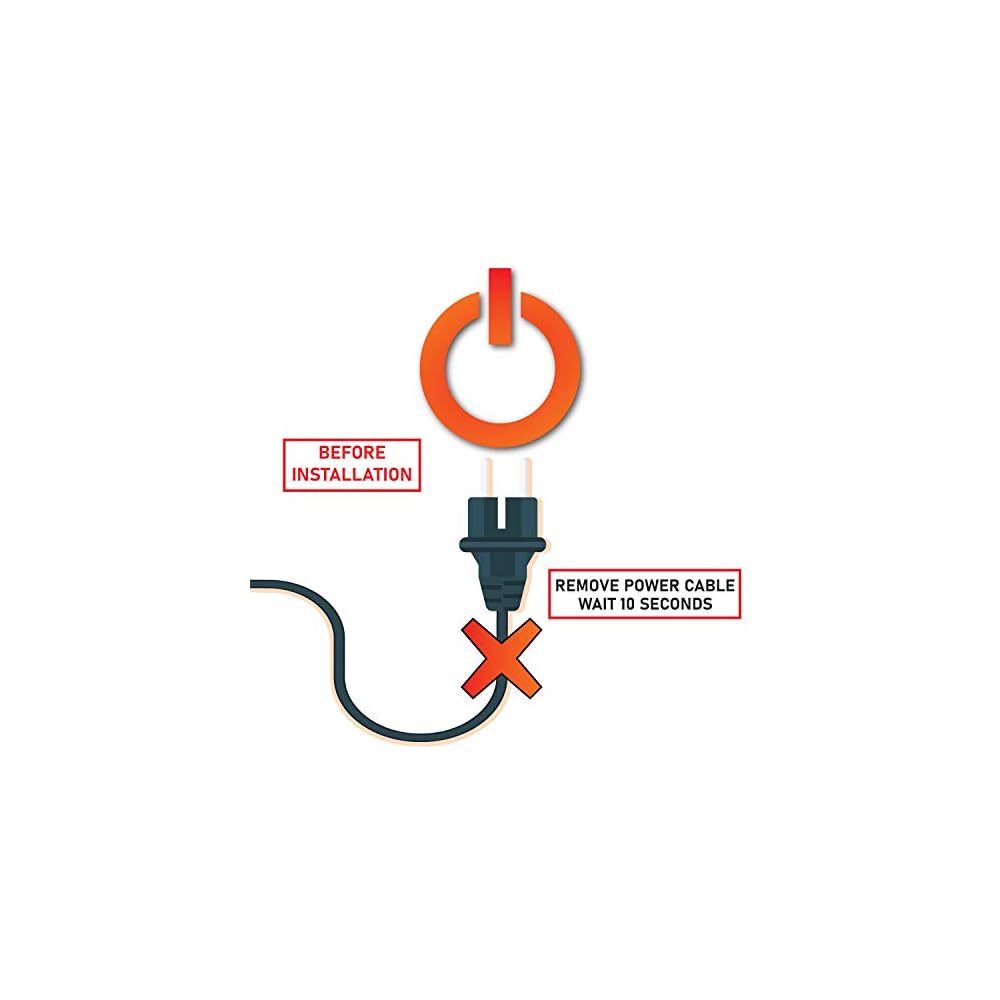
- *** Installation Note *** USB power will always be on even when the system is shut down. Please unplug the PC power cable completely for 20 seconds before installation to avoid possible voltage spikes which may damage the chipset on the adapter. This adapter is designed to fit all USB 3.0 20 pin motherboard headers by standard specification. A small number of motherboards do not use standard USB 3.0 20 pin headers which may cause the adapter to get stuck in the socket.
- …Forceful removal of the adapter may cause the header socket to be damaged, LINKUP is not responsible for such damage. Connector 1 (Motherboard) - USB 3.0 Internal IDC 20 Pin MB Male Housing Header. Connector 2 (Front Panel) - USB 3.1 A-Key 20 Pin Front Panel Female Header / NOTE: Does not convert from 5GB/s to 10GB/s. Not compatible with USB 2.0 motherboard IDC connector
- Active chipset enables full USB-C features, preserves the functions of Channel Configuration pins (CC1&CC2); including attach/removal detection, plug orientation detection, and current advertisement. Also the communications required by the Power Delivery and Alternate Mode.
- *** Note on USB current over limit issue: The power from the USB 3.0 header on the motherboard has a power rating at 4.5W (0.9A x 5V). However, many USB-C devices can withdraw power up to 100W (20A x 5V). This may result in a power shut down to protect the motherboard and its components. Not compatible with iPad Pro and other tablets for charging through this port.
| Compatible Devices | Desktop, Tablet |
| Specific Uses For Product | PC |
| Connector Type | USB Type C |
| Number of Ports | 1 |
| Input Voltage | 5 Volts |
| Current Rating | 20 Amps |
| Power Plug Type | No Plug |
| Smart Home Compatibility | Not Smart Home Compatible |
| Color | USB 3.0 to USB 3.1 Adapter |
| Finish | Matte |
| Item Dimensions | 4.33 x 3.15 x 0.59 inches (11 x 8 x 1.5 cm) |
| Item Weight | 0.64 Ounces (18.14 grams) |
| Package Quantity | 1 |
| Unit Count | 1.0 Count |
| Number of Items | 1 |
| Brand | LINKUP |
| Model Number | ADP-U3IDC20F-U31AKEY20F |
| UPC | 882991005086 |
| Manufacturer | LINKUP Technology Inc. |
| Mfr Part Number | ADP-U3IDC20F-U31AKEY20F |
| Item dimensions L x W x H | 4.33 x 3.15 x 0.59 inches (11 x 8 x 1.5 cm) |
Who Should Buy?

-
PC Builders
Ideal for those assembling custom PCs who need USB-C connectivity at the front panel for easy access.
-
Tech Enthusiasts
Perfect for users who frequently connect USB-C devices and seek efficient access to ports for better usability.
-
Gamers
Helpful for gamers wanting quick connections for accessories, improving overall gaming experience with minimal hassle.

-
Tablet Users
Not suitable for tablet users who primarily utilize built-in ports without the need for front panel installation.
-
Minimalists
May not appeal to those who prefer a clutter-free setup without additional cables or front panel modifications.
-
Budget Shoppers
Users seeking lower-priced options might find other less expensive alternatives that meet their requirements better.
Product Description
Have any Query? Chat with us
Customer Questions & Answers
-
Question:
What is the LINKUP USB-C Front Panel Adapter used for?
Answer: The LINKUP USB-C Front Panel Adapter is designed to convert your motherboard's 3.03.1 IDC20 19-pin header into a USB-C Type-A connection. This functionality allows you to connect various USB-C devices directly to your computer's front panel. This is especially useful for users who frequently use USB-C peripherals like smartphones, external drives, or other devices, providing convenient access without having to reach around to the back of the PC. -
Question:
Is the LINKUP USB-C Front Panel Adapter compatible with all motherboards?
Answer: While the LINKUP USB-C Front Panel Adapter is designed for motherboards with a 3.03.1 IDC20 19-pin header, it's essential to check your motherboard specifications before purchasing. Most modern motherboards support this header, enabling seamless integration of USB-C functionality. This adapter is perfect for custom builds or upgrading older systems to accommodate the latest USB-C technology. -
Question:
Can I use the LINKUP USB-C adapter with any USB-C device?
Answer: Yes, the LINKUP USB-C Front Panel Adapter is compatible with all USB-C devices. Whether it’s smartphones, tablets, or external drives, this adapter provides an effective solution for connections. Use it to easily transfer data, charge devices, or connect peripherals, making it an essential accessory for tech enthusiasts and everyday users alike. -
Question:
How does this adapter improve my PC setup?
Answer: The LINKUP USB-C Front Panel Adapter enhances your PC setup by providing faster connectivity options directly at the front of your tower, simplifying access to USB-C ports. By incorporating this adapter, you streamline your workflow and reduce cable clutter, resulting in an overall cleaner and more efficient workspace for both gamers and professionals. -
Question:
What type of installation is required for the LINKUP USB-C Front Panel Adapter?
Answer: Installation of the LINKUP USB-C Front Panel Adapter is straightforward. It typically involves connecting the adapter to the motherboard’s 3.03.1 IDC20 19-pin header and securing the front panel in your PC case. This no-fuss installation process is ideal for both beginners and experienced users looking to upgrade their PC capabilities without extensive technical expertise. -
Question:
Does the LINKUP USB-C adapter support fast charging?
Answer: The LINKUP USB-C Front Panel Adapter is designed to support fast charging features compatible with various USB-C devices. This means you can quickly power up smartphones or charge other devices while transferring data. This dual functionality is particularly beneficial for users who regularly utilize their devices and want to maintain efficiency. -
Question:
What are the key benefits of using the LINKUP USB-C Front Panel Adapter?
Answer: The key benefits of using the LINKUP USB-C Front Panel Adapter include improved accessibility to USB-C connections, enhanced data transfer speeds, and the ability to charge devices quickly. Additionally, it helps modernize older systems by facilitating USB-C integration, making it a practical solution for anyone looking to enhance their PC's functionality. -
Question:
Can this adapter be used in a gaming PC?
Answer: Yes, the LINKUP USB-C Front Panel Adapter is an excellent addition to any gaming PC. It allows gamers to connect USB-C gaming peripherals, such as controllers and headsets, without needing to access back panel ports. This convenience can significantly enhance the gaming experience, enabling quick device swaps and hassle-free connectivity. -
Question:
How does this adapter help with device compatibility?
Answer: The LINKUP USB-C Front Panel Adapter bridges the gap between older motherboard technology and the modern USB-C standard. This compatibility ensures that even with an older motherboard, users can utilize the latest USB-C devices without the need for additional conversion adapters. It's a simple upgrade that allows for future-proofing your tech setup. -
Question:
Where can I buy the LINKUP USB-C Front Panel Adapter?
Answer: You can purchase the LINKUP USB-C Front Panel Adapter on Ubuy in South Korea. Ubuy offers a wide selection of tech accessories, ensuring you can find this adapter with ease and confidence.
LINKUP Computer Cable Adapters ADP-U3IDC20F-U31AKEY20F Editorial Review


The LINKUP [Active Chip] USB 3.0 3.1 Gen 2 Internal IDC 20 Pin Motherboard Header to A-Key Type-E 20 Pin Female Converter for Type C Panel Mount Adapter is an adapter that allows users to convert a USB 3.0 header to a USB-C port. It is compatible with most motherboards, as long as they have an extra 3.0 header on the motherboard. This adapter will work for all USB3.0 20PINs header as well. It is easy to install and makes the front panel's Type-C port functional. However, this should be Considered a permanent installation as it is impossible to remove without damaging the motherboard. There are some issues with compatibility, and not all users were successful in using this adapter.
Customer Reviews & Ratings
1077 customers ratings
-
5 Star
71%
-
4 Star
13%
-
3 Star
5%
-
2 Star
3%
-
1 Star
8%
Review this product
Share your thoughts with other customers
Pros
- Easy to install
- Converts USB 3.0 header to USB-C
- Enables Type-C port on front panel
Cons
- Should be Considered a permanent installation as it is impossible to remove
Product Price History
Important information
- Limitations : For products shipped internationally, please note that any manufacturer warranty may not be valid; manufacturer service options may not be available; product manuals, instructions, and safety warnings may not be in destination country languages; the products (and accompanying materials) may not be designed in accordance with destination country standards, specifications, and labeling requirements; and the products may not conform to destination country voltage and other electrical standards (requiring use of an adapter or converter if appropriate). The recipient is responsible for assuring that the product can be lawfully imported to the destination country. When ordering from Ubuy or its affiliates, the recipient is the importer of record and must comply with all laws and regulations of the destination country.
- Not all the products listed on Ubuy are for sale, as Ubuy is a global search engine. Products are subject to export/trade regulations.
KRW 44166
Order now and get it around Wednesday, June 24
This item is not restrict in my country.(Please click on above link if this item is not restrict in your country, So our team will review and allow.)
QTY:
Only 11 items left in stock.
Secured transaction
Ubuy works hard to protect your security and privacy. Our advanced payment security system ensures confidentiality by encrypting your information during transmission using AES (Advanced Encryption Standards) and SSL (Secure Socket Layer) protocols. Your payment details are 100% secure as we do not share your payment details with third party sellers.
Our Top Logistics Partners
Fastest cross-border delivery
Features & Benefits
- Active chipset enables full USB-C features
- Preserves the functions of Channel Configuration pins
- Includes attach/removal detection
- Includes plug orientation detection
- Includes current advertisement
- Includes communications required by Power Delivery and Alternate Mode