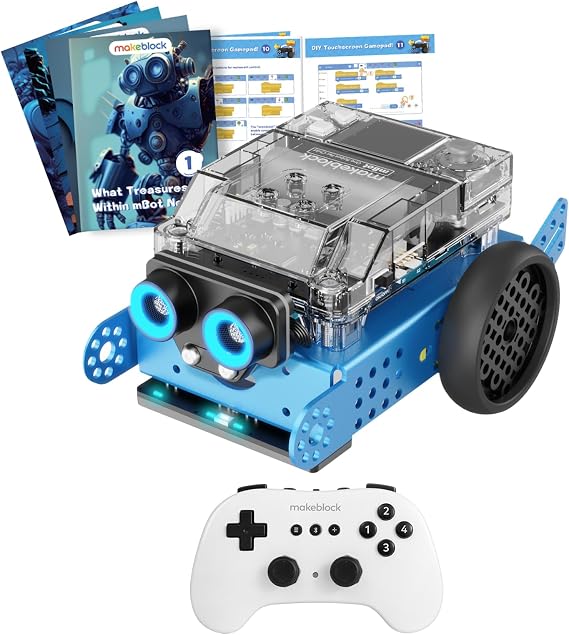
Makeblock mBot2 Educational Coding Robot with Bluetooth Wireless Remote Controller, Scrath and Python Programming in Classroom, AI and Technology Learning for Kids
mBot Neo is a powerful tool to get in touch with advanced technology such as AI, IoT and Data Science.
Makeblock mBot2 Educational Coding Robot with Bluetooth Wireless Remote Controller, Scrath and Python Programming in Classroom, AI and Technology Learning for Kids
제품번호 #: 36775453

Makeblock mBot2 Educational Coding Robot with Bluetooth Wireless Remote Controller, Scrath and Python Programming in Classroom, AI and Technology

제품번호 #: 36775453

KRW 448354

Price Details

Excluding Shipping & Custom charges ( Shipping and custom charges will be calculated on checkout )

*All items will import from 미국

0 ratings 리뷰 작성
재고
미국 USA 스토어에서 가져옴

QTY:

지금 주문하시면 도착 예정일 수요일, 9월 23
Our Top Logistics Partners
  • fedex
  • dhl
mBot Neo is a powerful tool to get in touch with advanced technology such as AI, IoT and Data Science.
U-Care 보증:
없음
요금제 선택
fast shipping

Fast
Shipping

free return

Free
Return*

secure packaging

Secure Packaging

100% original products

100% Original Products

pci-dss

PCI DSS Compliance

iso certified

ISO 27001 Certified


paypal payment
visa payment
mastercard payment
bank transfer payment
l. pay payment
culture voucher payment
cashbee payment
toss pay payment
kakao pay payment
lg pay payment
samsung pay payment
credit cards korea payment
happy money payment
teencash payment
t-money payment
book gift voucher payment
egg money payment
mobiamo payment
payco payment
Note: Step Down Voltage Transformer required for using electronics products of 미국 store (110-120). Recommended power converters 지금 구매.

What Stands Out

Dual Programming Options
Supports Scratch and Python programming, allowing kids to seamlessly transition from visual coding to text-based coding, enhancing their coding skills and understanding of programming concepts.
Interactive Learning
Engages children with hands-on projects and real-time challenges, fostering creativity and critical thinking in technology and AI learning, making it fun and educational.
Bluetooth Connectivity
Equipped with a Bluetooth remote controller, enabling easy control and interaction with the robot from a distance, enhancing user experience and accessibility for classrooms or home learning.

제품 세부 정보

Discover the Makeblock mBot Neo Educational Coding Robot at Ubuy South Korea. Teach kids Scrath and Python programming in the classroom with this AI technology learning tool. Shop now!
  • One-on-one Bluetooth Remote Controller pair for one mBot Neo robot, ideal for classroom teaching.
  • STEM educational robot kit for kids 8-12 to learn robotics, Scratch & Python Coding, and electronics.
  • 4-core MCU with WIFI and Bluetooth modules enables Python programming, high-precision metal gear encoder motors, and various sensors for interactive projects.
  • Interactive drag-and-drop software for programming learning, supporting Scratch or Python language with tutorials and project cases.
  • Expandable with over 60 different modules, connect up to 10 sensors, motors, or other components, and add-on packs available for further learning.
Brand NameMakeblock
Age Range DescriptionKid
Educational ObjectiveCoding Skills
Set NamemBot2
Manufacturer Maximum Age (MONTHS)144
Number of Packs1
Model NumbermBot Neo
ThemeRobot,Robots
Battery DescriptionRechargeable
Material TypeMetal
SizeMedium
Item Weight3.5 lbs (1.59 kg)

Who Should Buy?

Suitable For
  • Young Learners

    Ideal for children ages 8-14, promoting early interest in coding and robotics through hands-on experience.

  • Educators

    Perfect for teachers seeking innovative tools to incorporate programming and technology into their curriculum.

  • STEM Programs

    Excellent for after-school STEM programs, fostering collaborative learning and problem-solving skills among students.

Not Suitable For
  • Advanced Coders

    Not suitable for experienced programmers looking for complex coding challenges or advanced robotics functionality.

제품 설명

Makeblock mBot2 Educational Coding Robot with Bluetooth Wireless Remote Controller, Scrath and Python Programming in Classroom, AI and Technology Learning for Kids

질문이 있으십니까? 채팅하기

고객 질문 및 답변

  • 의문: What programming languages can I use with the Makeblock mBot2?

    답변: The Makeblock mBot2 is compatible with Scratch and Python programming languages. Scratch is perfect for beginners as it uses a visual block-based approach, making it easy to learn coding concepts. Python, on the other hand, is ideal for advanced programming and allows for more complex and versatile project creations. This dual-language support enables users of all ages and skill levels to engage in coding activities that enhance problem-solving and logical thinking skills.
  • 의문: What features does the Makeblock mBot2 include?

    답변: The mBot2 comes equipped with a variety of features such as Bluetooth connectivity, a wireless remote controller, and various sensors like ultrasonic and line-following sensors. These features allow users to navigate and interact with their environment effectively. The integration of AI and technology engages students in hands-on learning experiences, promoting creativity while allowing them to explore real-world applications of robotics and coding.
  • 의문: Is the Makeblock mBot2 suitable for classrooms?

    답변: Absolutely! The Makeblock mBot2 is designed specifically for educational environments. It promotes collaborative learning, encourages teamwork, and enhances classroom engagement through interactive coding activities. With its user-friendly interface and compatibility with Scratch and Python, students from elementary to high school can effectively learn programming concepts while working on exciting projects.
  • 의문: Can the mBot2 be controlled using a smartphone or tablet?

    답변: Yes, the Makeblock mBot2 can be controlled via Bluetooth using a smartphone or tablet. Users can download the Makeblock app, which is compatible with both iOS and Android devices. This allows students to engage with the robot wirelessly, promoting flexibility in learning and coding. Using a mobile device also makes it more accessible for students to test their coding skills on the go, enhancing their coding experience.
  • 의문: What age group is the Makeblock mBot2 intended for?

    답변: The Makeblock mBot2 is suitable for a wide range of age groups, typically recommended for ages 8 and up. It offers various difficulty levels in programming, making it perfect for beginners and more experienced coders. The structured learning environment allows educators to adapt lessons based on student age and skill level, facilitating a comprehensive learning experience that grows with the students.
  • 의문: What types of projects can be created with the mBot2?

    답변: With the Makeblock mBot2, users can create a variety of projects, including obstacle-avoiding robots, line-following robots, and even interactive games. The versatility of the mBot2 encourages creativity as students can explore different configurations and coding techniques. This hands-on approach fosters an understanding of robotics, coding, and engineering principles, making it ideal for project-based learning in the classroom.
  • 의문: Is there any online support or community for mBot2 users?

    답변: Yes, Makeblock offers a wealth of online resources including tutorials, documentation, and project ideas on their official website. Additionally, there is a vibrant community of users who share their projects and coding solutions on forums and social media platforms. This support network ensures that both educators and students can find help and inspiration as they work with the mBot2, making the learning process more enjoyable.
  • 의문: Does the mBot2 come assembled or does it require building?

    답변: The Makeblock mBot2 comes in a semi-assembled form, requiring some assembly to complete. This feature enhances the educational value, as students can participate in building the robot, learning about its components and how they function together. This assembly process serves as a practical introduction to robotics, making it an interactive experience that promotes teamwork and critical-thinking skills.
  • 의문: What sensors are included with the Makeblock mBot2?

    답변: The Makeblock mBot2 includes several sensors, notably an ultrasonic sensor for distance measurement, a line-following sensor, and ambient light sensors. These sensors enable the mBot2 to interact with its environment, providing students practical experience in robotics. By utilizing these sensors, students can experiment with different coding challenges, enhancing their understanding of how robots can navigate and respond to their surroundings.
  • 의문: Where can I buy the Makeblock mBot2 Educational Coding Robot?

    답변: You can buy the Makeblock mBot2 Educational Coding Robot with Bluetooth Wireless Remote Controller at Ubuy in South Korea. Ubuy provides a reliable online shopping experience with a wide range of educational products, ensuring you have access to the best tools for enhancing your teaching or learning experience.

Makeblock Science Kits & Toys mBot Neo Editorial Review

The Makeblock mBot2 Educational Coding Robot with Bluetooth Wireless Remote Controller engages kids in AI and technology learning while enhancing their coding skills through Scratch and Python programming. Designed for kids aged up to 12 years, this medium-sized robot is made of durable metal and features a rechargeable battery for endless play. Parents appreciate how this robot fosters creativity and problem-solving abilities in a fun, interactive way, making it a great educational tool for classrooms. Its user-friendly nature allows children to dive deep into coding and robotics effortlessly, sparking curiosity and innovation.

Customer Reviews & Ratings

1 고객 평가
  • 5 점
    100%
  • 4 점
    0%
  • 3 점
    0%
  • 2 점
    0%
  • 1 점
    0%

이 제품 리뷰하기

다른 고객들과 의견을 공유하세요.

장점

  • Enhances coding skills in a fun way
  • Supports Scratch and Python programming
  • Durable metal construction for longevity
  • Rechargeable battery for continuous use
  • Ideal for classroom and at-home learning

단점

  • May require adult supervision during initial setup

Platform Trust & Buyer Confidence

trustpilot logo
4.2/5 9477 리뷰
Read reviews
JK
Jasmin
Verified buyer

“Great products and very good service: very easy and very fast international delivery.”

9 September 2026 · via Trustpilot
AG
Anke
Verified buyer

“Wonderful online shopping experience, smooth transaction from the start. Payment method works conveniently and delivery is unexpectedly fast and reliable. You go the extra mile for service. What makes this even more amazing, you deliver to Namibia. I will remain a happy Ubuy customer and will increase my purchases for sure! Thank you!”

10 September 2026 · via Trustpilot
H
Hazel
Verified buyer

“Very easy to find the products what you need, and so fast delivery, that’s why I highly recommended to others costumers to used ubuy.”

10 September 2026 · via Trustpilot
O
Opaleye
Verified buyer

“I received exactly what I ordered I was skeptical about your site because that was my first time to order. But the order came timely and neatly packaged. I was not disappointed. Thank you.”

11 September 2026 · via Trustpilot
AC
Adele
Verified buyer

“Easy to find and order what you want on the website. Delivery is quick to the UK”

8 September 2026 · via Trustpilot
보안 결제 Global Delivery Easy Returns Genuine Products

Product Price History

중요 정보

  • 제한 사항: 국제 배송되는 제품의 경우 제조업체 보증이 유효하지 않을 수 있으며, 제조업체 서비스 옵션을 사용하지 못하거나 제품 설명서, 지침 및 안전 경고가 대상 국가 언어로 표시되지 않을 수 있으며, 제품(및 첨부 자료)은 도착 국가 표준, 사양 및 라벨링 요구 사항에 따라 설계되지 않을 수 있으며, 제품은 목적지 국가 전압 및 기타 전기 표준을 준수하지 않을 수 있습니다(가능한 경우 어댑터 또는 변환기 사용 필요). 수령인은 제품을 도착 국가로 합법적으로 수입할 수 있는지 확인할 책임이 있습니다. Ubuy 또는 그 제휴사에서 주문할 때, 수령인은 기록 수입자로서 도착 국가의 모든 법률과 규정을 준수해야 합니다.
  • Ubuy는 글로벌 검색 엔진이므로 Ubuy에 나열된 모든 제품이 판매용은 아닙니다. 제품은 수출/무역 규정을 따릅니다.