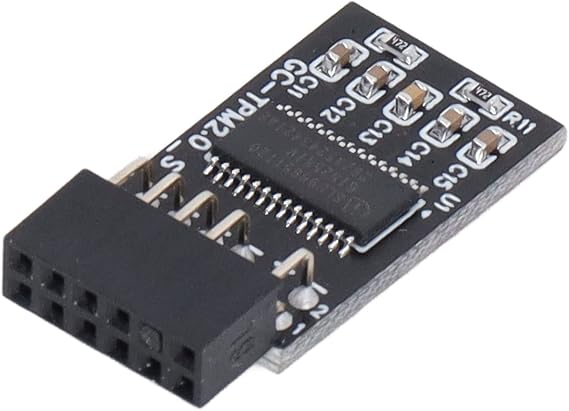
TPM 2.0 Module 12 Pin Security Module SPI Interface Security Module Remote Card Security Module Encryption Security Board Accessory w4 accessories tpm module for GIGABYTE
A secure cryptographic processor that helps you perform operations such as generating, storing, and restricting the use of cryptographic keys.
TPM 2.0 Module 12 Pin Security Module SPI Interface Security Module Remote Card Security Module Encryption Security Board Accessory w4 accessories tpm module for GIGABYTE
제품번호 #: 53792308

TPM 2.0 Module 12 Pin Security Module SPI Interface Security Module Remote Card Security Module Encryption Security Board Accessory w4 accessories

제품번호 #: 53792308

KRW 28575

Price Details

Excluding Shipping & Custom charges ( Shipping and custom charges will be calculated on checkout )

*All items will import from 미국

0 ratings 리뷰 작성
재고
미국 USA 스토어에서 가져옴
지금 주문하시면 도착 예정일 목요일, 7월 02
Our Top Logistics Partners
  • fedex
  • dhl
A secure cryptographic processor that helps you perform operations such as generating, storing, and restricting the use of cryptographic keys.
U-Care 보증:
없음
요금제 선택
fast shipping

Fast
Shipping

free return

Free
Return*

secure packaging

Secure Packaging

100% original products

100% Original Products

pci-dss

PCI DSS Compliance

iso certified

ISO 27001 Certified


paypal payment
visa payment
mastercard payment
bank transfer payment
l. pay payment
culture voucher payment
cashbee payment
toss pay payment
kakao pay payment
lg pay payment
samsung pay payment
credit cards korea payment
happy money payment
teencash payment
t-money payment
book gift voucher payment
egg money payment
mobiamo payment
payco payment
Note: Step Down Voltage Transformer required for using electronics products of 미국 store (110-120). Recommended power converters 지금 구매.

제품 세부 정보

Secure your GIGABYTE device with the TPM 2.0 Module. Enhance security with 12 Pin Security Module featuring SPI Interface. Shop now at Ubuy South Korea.
Item Weight0.2 lbs (90 grams)

제품 설명

TPM 2.0 Module 12 Pin Security Module SPI Interface Security Module Remote Card Security Module Encryption Security Board Accessory w4 accessories tpm module for GIGABYTE

About This Item

Introducing the TPM 2.0 Module 12 Pin Security Module SPI Interface Security Module Remote Card Security Module Encryption Security Board Accessory for GIGABYTE Looking to enhance the security of your GIGABYTE system? Look no further than the TPM 2.0 Module 12 Pin Security Module SPI Interface Security Module Remote Card Security Module Encryption Security Board Accessory. This advanced module is designed to provide an added layer of security for your GIGABYTE device, ensuring that your data and sensitive information are safeguarded. With the GIGABYTE TPM 2.0 Module, you can experience the benefits of a secure and protected computing environment. By incorporating trusted platform module (TPM) technology, this module offers enhanced security features that help prevent unauthorized access and protect your system from potential threats. The 12 Pin Security Module is specifically designed to work seamlessly with your GIGABYTE system, ensuring compatibility and optimal performance.

By simply installing this module, you can enjoy the peace of mind that comes with knowing your device is equipped with the latest security features. The SPI Interface Security Module takes security a step further by providing an additional layer of encryption. This ensures that your data remains confidential and protected, even in the face of potential hacking attempts. With this module, you can trust that your information will remain secure, whether you're accessing sensitive documents or conducting online transactions. Installing the TPM 2.0 Module is a breeze with its user-friendly installation process.

Simply follow the provided instructions and you'll have it up and running in no time. Once installed, you can take advantage of the module's features, including secure boot, secure storage, and secure key generation, to name just a few. Don't compromise the security of your GIGABYTE system. Invest in the trusted and reliable TPM 2.0 Module 12 Pin Security Module SPI Interface Security Module Remote Card Security Module Encryption Security Board Accessory for GIGABYTE and enjoy the peace of mind that comes with knowing your data is protected.

Upgrade your system today and experience the benefits of enhanced security and peace of mind.

질문이 있으십니까? 채팅하기

고객 질문 및 답변

  • 의문: What is a TPM 2.0 module and what does it do?

    답변: A TPM 2.0 module is a specialized secure cryptographic processor designed to secure hardware through integrated cryptographic keys. It provides enhanced security for your computer, enabling functions like secure boot, disk encryption, and the generation of random numbers for cryptographic purposes. By validating the integrity of hardware and software, the module protects sensitive data from unauthorized access, making it essential for businesses and individual users interested in cybersecurity.
  • 의문: How does the 12 Pin Security Module connect to my system?

    답변: The 12 Pin Security Module typically connects to the motherboard via an SPI (Serial Peripheral Interface) connection. This standardized connection ensures that the TPM functions efficiently with the CPU and other hardware components. When installed correctly on compatible motherboards, it allows for secure initialization of your operating system and protects against malicious attacks, ensuring that only trusted software runs on your system.
  • 의문: Can I use the TPM 2.0 module in any computer?

    답변: No, the compatibility of a TPM 2.0 module depends on the motherboard's support for TPM. Most modern motherboards designed for secure operations come with a dedicated header for the TPM module or built-in support. To check compatibility, refer to your motherboard's manual or the manufacturer's website to find specific requirements and ensure seamless integration for enhanced security functionalities.
  • 의문: What are some common applications of a TPM 2.0 module?

    답변: TPM 2.0 modules are commonly used in various applications such as securing sensitive data, enabling full disk encryption, and supporting secure boot processes. They are also utilized in enterprise environments for managing digital rights, authenticating devices, and ensuring compliance with security policies. For individuals, having a TPM module can significantly enhance the security of personal data stored on your computer, especially when using sensitive applications like online banking.
  • 의문: How does the TPM module enhance system security?

    답변: The TPM module enhances system security by providing a hardware-based root of trust, which is crucial for secure boot processes. This ensures that your system boots using only trusted software, preventing malware from infiltrating upon startup. Additionally, it can store cryptographic keys and credentials securely, allowing for improved security features like BitLocker Drive Encryption in Windows, ultimately protecting sensitive data from unauthorized access.
  • 의문: What should I consider when installing a TPM 2.0 module?

    답변: When installing a TPM 2.0 module, it's essential to ensure that your motherboard supports this feature. Check the physical header alignment, and consult the manual for any specific installation instructions. Additionally, post-installation, verify that the TPM is enabled in your system BIOS settings. Proper installation is crucial to leverage its full potential in enhancing system security, especially for sensitive operations or environments.
  • 의문: Is a remote card security module necessary if I have a TPM 2.0?

    답변: While a TPM 2.0 module offers essential security features, a remote card security module can provide additional layers of authentication and access control. It allows for two-factor authentication (2FA) by requiring both physical possession of the card and access to the machine. This combination is beneficial for enterprises needing higher levels of security for critical systems, ensuring both hardware and identity-based protections are in place.
  • 의문: How do I check if my current system has a TPM?

    답변: You can check for the presence of a TPM in Windows by opening the Run dialog (Windows + R) and typing 'tpm.msc'. This opens the TPM Management Console, showing whether a TPM is enabled, along with its specifications. For Linux users, various command-line tools can also help verify the presence and state of the TPM. Knowing whether you have a TPM can help you understand the security capabilities of your system.
  • 의문: What type of encryption does the TPM 2.0 module support?

    답변: The TPM 2.0 module supports several encryption algorithms, including RSA, AES, and SHA algorithms. This flexibility allows for various encryption protocols tailored to different security needs. AES (Advanced Encryption Standard) is commonly used for disk encryption (like BitLocker), whereas RSA is used for secure transactions and communications. This versatility makes the TPM module suitable for various applications requiring strong encryption and key management.
  • 의문: Where can I buy the TPM 2.0 Module in South Korea?

    답변: You can buy the TPM 2.0 Module 12 Pin Security Module from Ubuy in South Korea. Ubuy is a reputable online marketplace that offers a wide range of electronics and accessories, including security modules, ensuring that you can find a quality TPM 2.0 module for your needs. Their platform provides user-friendly navigation and product information to help you make an informed purchasing decision.

Marhynchus Home Security Systems Editorial Review

The TPM 2.0 Module for GIGABYTE is a highly recommended security enhancement for GIGABYTE motherboards. It provides advanced security features such as secure boot and device authentication. The setup process is straightforward and users have reported seamless integration with their systems. The module's SPI interface and remote card capabilities make it a versatile and reliable choice for users looking to enhance the security of their system. Overall, customers have been impressed with the performance and security benefits of the TPM 2.0 Module for GIGABYTE. It has received positive feedback for its ease of installation and robust security features, making it a valuable addition to GIGABYTE motherboards.

Customer Reviews & Ratings

5.0
1 고객 평가
  • 5 점
    100%
  • 4 점
    0%
  • 3 점
    0%
  • 2 점
    0%
  • 1 점
    0%

이 제품 리뷰하기

다른 고객들과 의견을 공유하세요.

장점

  • Advanced security features such as secure boot and device authentication
  • Straightforward setup process
  • Versatile with SPI interface and remote card capabilities
  • Seamless integration with GIGABYTE motherboards

단점

  • No notable negative feedback provided

Product Price History

중요 정보

  • 제한 사항: 국제 배송되는 제품의 경우 제조업체 보증이 유효하지 않을 수 있으며, 제조업체 서비스 옵션을 사용하지 못하거나 제품 설명서, 지침 및 안전 경고가 대상 국가 언어로 표시되지 않을 수 있으며, 제품(및 첨부 자료)은 도착 국가 표준, 사양 및 라벨링 요구 사항에 따라 설계되지 않을 수 있으며, 제품은 목적지 국가 전압 및 기타 전기 표준을 준수하지 않을 수 있습니다(가능한 경우 어댑터 또는 변환기 사용 필요). 수령인은 제품을 도착 국가로 합법적으로 수입할 수 있는지 확인할 책임이 있습니다. Ubuy 또는 그 제휴사에서 주문할 때, 수령인은 기록 수입자로서 도착 국가의 모든 법률과 규정을 준수해야 합니다.
  • Ubuy는 글로벌 검색 엔진이므로 Ubuy에 나열된 모든 제품이 판매용은 아닙니다. 제품은 수출/무역 규정을 따릅니다.