






제품번호 #:
137852843
Epson Workforce ES-500W II Wireless Color Duplex Desktop Document Scanner
85% of respondents would recommend this to a friend
 1 Sustainability Highlights
제품번호 #:
137852843
KRW 678221
Price Details
Excluding Shipping & Custom charges ( Shipping and custom charges will be calculated on checkout )
*All items will import from 미국
17%
재고
 USA 스토어에서 가져옴
QTY:
제품 재고가 2개 뿐입니다.
지금 주문하시면 도착 예정일 Monday, 9월 14
Secured transaction
Ubuy works hard to protect your security and privacy. Our advanced payment security system ensures confidentiality by encrypting your information during transmission using AES (Advanced Encryption Standards) and SSL (Secure Socket Layer) protocols. Your payment details are 100% secure as we do not share your payment details with third party sellers.
Our Top Logistics Partners


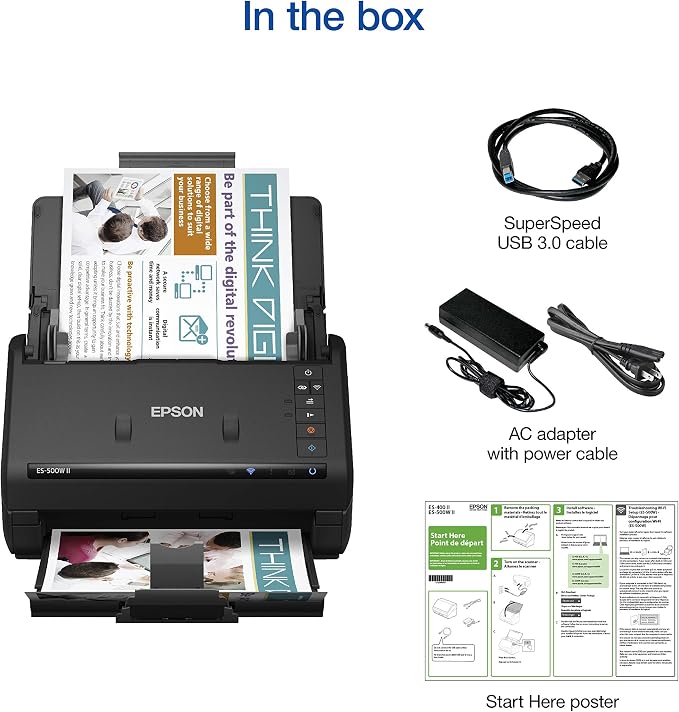
Easily scan to searchable PDFs and editable Word and Excel files with included Epson ScanSmart Accounting Edition Software.

Fast
Shipping

Free
Return*

Secure Packaging

100% Original Products

PCI DSS Compliance

ISO 27001 Certified



















Note: Step Down Voltage Transformer required for using electronics products of 미국 store (110-120). Recommended power converters 지금 구매.


What Stands Out
Wireless Connectivity
Easily connect to both PC and Mac devices, allowing seamless document scanning without cluttering your workspace with cables, enhancing productivity and flexibility.
Duplex Scanning
Scan both sides of a document in a single pass, saving time and effort, ideal for busy professionals needing efficient document management.
Auto Document Feeder
The 50-sheet ADF allows for continuous scanning of multiple documents, significantly increasing efficiency for bulk jobs while ensuring consistent, high-quality results.
제품 세부 정보
| Scanner Type | Document |
| Connection Type | Wi-Fi |
| Resolution | 300 |
| Wattage | 11 watts |
| Color Depth | 8 bpp |
| Standard Sheet Capacity | 50 |
| Optical Sensor Technology | CCD |
| Light Source Type | CCD |
| Media Type | USB |
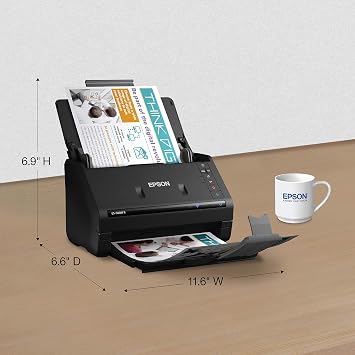
| Item Dimensions D x W x H | 11.6"D x 6.6"W x 6.9"H (29.5 x 16.8 x 17.5 cm) |
| Item Weight | 8.1 pounds (3.67 kg) |
| Brand | Epson |
| Model Name | B11B263201 |
| UPC | 010343960190 |
| Unit Count | 1 Count |
| Item Type Name | Document Scanner |
| Manufacturer | Epson |
| Minimum System Requirements | Windows 7 |
| Connectivity Technology | Wi-Fi |
| Product Dimensions (L x W x H) | 11.6"D x 6.6"W x 6.9"H (29.5 x 16.8 x 17.5 cm) |
Who Should Buy?

-
Small Business Owners
Ideal for small business owners needing efficient document management and high-quality scanning capabilities for various documents.
-
Students and Researchers
Perfect for students and researchers requiring quick scanning of books, articles, and papers for easy digital organization.
-
Remote Workers
Great choice for remote workers who require wireless scanning solutions to manage paperwork without a wired connection.

-
Heavy-Duty Users
Not suitable for users needing extensive high-volume scanning capabilities due to limited durability for heavy daily use.
제품 설명
Sustainability Highlights
This product has sustainability features recognized by trusted certifications.
Energy efficiency
Conserves energy compared to similar products. As certified by
Products that earn the U.S. Environmental Protection Agency’s ENERGY STAR label are independently certified to use less energy than standard models, reducing carbon pollution associated with energy generation and lowering your energy bill. For more information, visit energystar.gov. Learn more about this certification
질문이 있으십니까? 채팅하기
고객 질문 및 답변
-
의문:
What features does the Epson WorkForce ES-500W offer for document scanning?
답변: The Epson WorkForce ES-500W boasts features like wireless connectivity, high-quality color duplex scanning, and an automatic document feeder (ADF) that can handle up to 50 pages. This scanner is designed for efficiency, allowing you to scan both sides of a document simultaneously, saving time and improving productivity. It’s particularly beneficial in a home office or professional setting where multiple documents need to be digitized quickly. -
의문:
How does the wireless functionality of the Epson ES-500W enhance its usability?
답변: The wireless capability of the Epson ES-500W allows you to connect and scan from multiple devices without the clutter of cables. You can easily scan directly to cloud services or mobile devices using the Epson DocumentScan app. This feature is particularly useful for users who need to manage documents on-the-go or from different locations within their workspace, making it a versatile tool for increasing flexibility. -
의문:
What types of documents can be scanned using the Epson WorkForce ES-500W?
답변: The Epson WorkForce ES-500W is versatile and can scan a variety of documents, including receipts, contracts, and photos. With its advanced imaging technology, it produces high-quality scans of both text and images. This makes it ideal for businesses requiring the digitization of diverse document types, as well as for individuals looking to organize personal papers. -
의문:
What is the scanning speed of the Epson WorkForce ES-500W?
답변: The Epson WorkForce ES-500W delivers fast scanning speeds of up to 35 pages per minute in simplex mode and can scan up to 70 images per minute in duplex mode. This speed is crucial for workflows that demand efficiency, particularly in busy offices where time-saving capabilities can lead to increased productivity and streamlined operations. -
의문:
Can the Epson ES-500W scan documents directly into cloud services?
답변: Yes, the Epson WorkForce ES-500W allows you to scan directly to cloud services like Google Drive, Dropbox, and Evernote. This functionality simplifies document management by enabling immediate uploads and access from anywhere. It's perfect for professionals who travel frequently or collaborate with teams who require access to shared documents in real-time. -
의문:
Is the Epson WorkForce ES-500W compatible with both PC and Mac?
답변: Yes, the Epson WorkForce ES-500W is fully compatible with both PC and Mac systems, allowing for easy integration in mixed-OS environments. Users can install the necessary drivers provided by Epson for seamless setup and functionality, ensuring that whether on Windows or macOS, document scanning remains a straightforward task. -
의문:
What are the advantages of using the automatic document feeder (ADF)?
답변: The automatic document feeder (ADF) on the Epson ES-500W enhances efficiency by enabling batch scanning of multiple documents without the need for manual intervention. With a capacity of 50 sheets, the ADF is useful in settings where large volumes of documents must be processed, such as in legal or financial institutions, reducing the time spent on manual feeding. -
의문:
What resolution can I expect from the Epson WorkForce ES-500W scans?
답변: The Epson WorkForce ES-500W offers a maximum optical resolution of 600 dpi, which results in clear and detailed document reproductions. This level of quality ensures that both text and images are captured accurately, making it suitable for digitizing important documents or photos where clarity is a priority. -
의문:
How does the Epson WorkForce ES-500W support document organization?
답변: The Epson WorkForce ES-500W supports document organization through various features, including selectable file formats (PDF, JPEG) and the ability to tag scanned files for easy retrieval. This functionality is ideal for users who need to keep their documents categorized and accessible, making it a valuable tool for both personal and professional document management. -
의문:
Where can I buy the Epson WorkForce ES-500W Wireless Color Duplex Document Scanner?
답변: You can buy the Epson WorkForce ES-500W Wireless Color Duplex Document Scanner for PC and Mac through Ubuy in South Korea. Ubuy offers a reliable shopping experience with a range of options to ensure you find the best fit for your scanning needs.
Epson Document Scanners Editorial Review


Epson Workforce ES-500W II Wireless Color Duplex Desktop Document Scanner offers high-performance scanning with a remarkable 35 pages per minute speed and features a 50-sheet auto document feeder for efficiency. Many users have praised its dual-sided scanning capability, making it an ideal choice for busy home offices or professional environments. The scanner's compact design enhances portability, and it supports both Wi-Fi and USB connections. However, some users noted initial challenges with wireless setup, though they found wired connections to be very reliable. Overall, this scanner combines speed, quality, and functionality, making it a top recommendation for those needing versatile document handling.
Customer Reviews & Ratings
502 고객 평가
-
5 점
73%
-
4 점
10%
-
3 점
9%
-
2 점
2%
-
1 점
6%
이 제품 리뷰하기
다른 고객들과 의견을 공유하세요.
장점
- Fast scanning speed of 35 pages per minute
- Dual-sided scanning for increased productivity
- Compact design saves valuable desk space
- User-friendly software for easy navigation
- Reliable wired connection for consistent performance
단점
- Initial wireless setup can be somewhat tricky
Platform Trust & Buyer Confidence

JG
Jazz
Verified buyer
“Easy to use and always helpful and sorts any issues I've had past and present”
1 September 2026 · via Trustpilot
EK
Emmanuel
Verified buyer
“I always receive support when I engage customer service. Overall my experience with UBUY has been top notch. Keep up the good work.”
31 August 2026 · via Trustpilot
F
fnd
Verified buyer
“The delivery was fast and the product came undamaged and authentic.”
29 August 2026 · via Trustpilot
LC
Leana
Verified buyer
“Ubuy is extremely efficient and to order online is an easy process. The verity of products to buy is really unlimited! My order was urgent and I got it on time. The products are great! Thank you Ubuy!”
25 August 2026 · via Trustpilot
HL
Hengo
Verified buyer
“Fast, convenient and cheap. Great store!”
27 August 2026 · via Trustpilot
보안 결제
Global Delivery
Easy Returns
Genuine Products
Product Price History
중요 정보
- 제한 사항: 국제 배송되는 제품의 경우 제조업체 보증이 유효하지 않을 수 있으며, 제조업체 서비스 옵션을 사용하지 못하거나 제품 설명서, 지침 및 안전 경고가 대상 국가 언어로 표시되지 않을 수 있으며, 제품(및 첨부 자료)은 도착 국가 표준, 사양 및 라벨링 요구 사항에 따라 설계되지 않을 수 있으며, 제품은 목적지 국가 전압 및 기타 전기 표준을 준수하지 않을 수 있습니다(가능한 경우 어댑터 또는 변환기 사용 필요). 수령인은 제품을 도착 국가로 합법적으로 수입할 수 있는지 확인할 책임이 있습니다. Ubuy 또는 그 제휴사에서 주문할 때, 수령인은 기록 수입자로서 도착 국가의 모든 법률과 규정을 준수해야 합니다.
- Ubuy는 글로벌 검색 엔진이므로 Ubuy에 나열된 모든 제품이 판매용은 아닙니다. 제품은 수출/무역 규정을 따릅니다.
KRW 678221
지금 주문하시면 도착 예정일 Monday, 9월 14
This item is not restrict in my country.(Please click on above link if this item is not restrict in your country, So our team will review and allow.)
QTY:
제품 재고가 2개 뿐입니다.
Secured transaction
PCI DSS compliant and ISO 27001:2022 certified, with encrypted payments and full buyer protection on every order.
Our Top Logistics Partners
Fastest cross-border delivery
특징 및 장점
- Wirelessly scan documents to PCs, smartphones, or cloud storage with ease.
- Impressive speeds of up to 35 ppm and 70 ipm enhance productivity.
- Robust 50-page Auto Document Feeder handles large stacks effortlessly.
- Compatible with various document formats from business cards to long invoices.
- Includes powerful software for easy file management and automatic naming.
- Built-in OCR technology creates searchable PDFs and editable documents.
Ubuy Assurance
Experience worry-free shopping with 100% original products, PCI DSS-compliant payment security, ISO 27001-certified data protection, the fastest cross-border delivery, free returns *, and secure packaging on every order.