

제품번호 #:
220515945
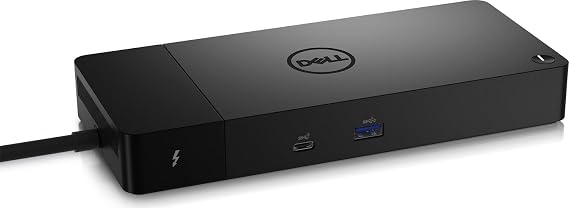
Dell ThunderBolt 4 Dock (WD22TB4), Black
78% of respondents would recommend this to a friend
제품번호 #:
220515945
KRW 325213
Price Details
Excluding Shipping & Custom charges ( Shipping and custom charges will be calculated on checkout )
*All items will import from 미국
0 ratings
리뷰 작성
재고
 USA 스토어에서 가져옴
QTY:
지금 주문하시면 도착 예정일 수요일, 9월 23
Secured transaction
Ubuy works hard to protect your security and privacy. Our advanced payment security system ensures confidentiality by encrypting your information during transmission using AES (Advanced Encryption Standards) and SSL (Secure Socket Layer) protocols. Your payment details are 100% secure as we do not share your payment details with third party sellers.
Our Top Logistics Partners


Modular Thunderbolt 4 Dock with swappable module capability for easy upgrades and SuperBoost technologies for fast charging

Fast
Shipping

Free
Return*

Secure Packaging

100% Original Products

PCI DSS Compliance

ISO 27001 Certified



















Note: Step Down Voltage Transformer required for using electronics products of 미국 store (110-120). Recommended power converters 지금 구매.


What Stands Out
Versatile Connectivity
The Dell ThunderBolt 4 Dock WD22TB4 offers multiple ports including USB-C, USB-A, HDMI, and Ethernet, ensuring seamless connectivity to a variety of devices for home or office use.
High-Speed Data Transfer
With Thunderbolt 4 technology, this dock enables data transfer speeds of up to 40 Gbps, allowing users to quickly transfer large files and enhance productivity without lag.
Dual 4K Display Support
Supports dual 4K displays, enabling an expansive workspace for multitasking and improved efficiency, making it ideal for graphic designers, video editors, and professionals needing high-resolution output.
제품 세부 정보
| Hardware Interface | Thunderbolt 4 |
| Compatible Devices | Dell, HDMI, Thunderbolt, USB C, Windows 10 |
| Total Usb Ports | 7 |
| Number of Ports | 11 |
| Total Number of HDMI Ports | 1 |
| Wattage | 180 watts |
| Input Voltage | 230 volts_of_alternating_current |
| Minimum Required Operating System Version | Windows 11 |
| Item Dimensions L x W x H | 9.7"L x 6.5"W x 1.1"H (24.6 x 16.5 x 2.8 cm) |
| Item Weight | 650 g |
| Color | Black |
| Brand | Dell |
| Number of Items | 1 |
| Number of Packs | 1 |
| Global Trade Identification Number | 05397184635629, 05397184718902 |
| Manufacturer | Dell Computers |
| Item Type Name | Doking Station |
| Model Number | DELL-WD22TB4 |
| Mfr Part Number | DELL-WD22TB4 |
| Total USB Ports | 7 |
| Product Dimensions (L x W x H) | 9.7"L x 6.5"W x 1.1"H (24.6 x 16.5 x 2.8 cm) |
| Total HDMI Ports | 1 |
Who Should Buy?

-
Remote Workers
Ideal for remote workers needing multiple connectivity options for laptops, enhancing productivity and workspace organization.
-
Content Creators
Great for video editors and graphic designers requiring high data transfer speeds and multiple display support.
-
Gamers
Designed for gamers using laptops, offering fast data transfer and multiple peripherals support for an enhanced gaming experience.

-
Casual Users
Not suitable for casual users needing only basic connectivity, as features may be excessive for their requirements.
제품 설명
Dell ThunderBolt 4 Dock (WD22TB4), Black
질문이 있으십니까? 채팅하기
고객 질문 및 답변
-
의문:
What are the key features of the Dell ThunderBolt 4 Dock WD22TB4?
답변: The Dell ThunderBolt 4 Dock WD22TB4 boasts crucial features like dual 4K display support, multiple USB-C and USB-A ports, and a 90W power delivery capability. This dock enhances your workspace by allowing you to connect up to three displays and a variety of peripherals—all while ensuring a single, powerful connection to your laptop. It's particularly useful for professionals engaged in graphic design or video editing who need high-resolution displays. -
의문:
Is the Dell ThunderBolt 4 Dock WD22TB4 compatible with all laptops?
답변: While the Dell ThunderBolt 4 Dock WD22TB4 is primarily designed for Thunderbolt 4 and USB-C compatible laptops, it may also work with USB-C devices, although with limited functionality. To ensure maximum performance and access to all features, utilizing a Thunderbolt 4 device is recommended. This compatibility is essential for users who mix work with various devices, as it guarantees seamless connectivity. -
의문:
How does the Dell ThunderBolt 4 Dock WD22TB4 improve workflow for remote workers?
답변: The Dell ThunderBolt 4 Dock WD22TB4 significantly enhances workflow by offering multiple connectivity options that simplify the setup process. Users can connect their laptop, keyboard, mouse, external drives, and dual monitors through a single cable. This consolidation helps in creating a clean and organized workspace, which is excellent for remote workers who need to switch between different tasks rapidly. -
의문:
Can I charge my laptop using the Dell ThunderBolt 4 Dock WD22TB4?
답변: Yes, the Dell ThunderBolt 4 Dock WD22TB4 supports charging through its USB-C connection, providing up to 90W of power delivery to compatible laptops. This feature greatly reduces the need for multiple chargers and keeps your workspace uncluttered. It's particularly beneficial for professionals who are often on the move and need a single docking solution that both powers and connects all their devices. -
의문:
What types of ports does the Dell ThunderBolt 4 Dock WD22TB4 have?
답변: The Dell ThunderBolt 4 Dock WD22TB4 incorporates a variety of ports, including USB-C Thunderbolt 4 ports, USB-A ports, an HDMI port, and an audio output jack. This extensive selection allows for diverse peripheral connections, catering to the needs of creative professionals who may require audio interfaces, additional storage, or multiple monitors for their work. -
의문:
How can I set up multiple displays with the Dell ThunderBolt 4 Dock WD22TB4?
답변: Setting up multiple displays with the Dell ThunderBolt 4 Dock WD22TB4 is straightforward. You can connect up to two 4K monitors via the dock using its HDMI and DisplayPort outputs. Simply connect your monitors to the respective ports and switch your laptop display settings to 'Extend' for a seamless multi-monitor experience. This is particularly beneficial for professionals who require extensive screen real estate for multitasking. -
의문:
Does the Dell ThunderBolt 4 Dock WD22TB4 support data transfer?
답변: Absolutely! The Dell ThunderBolt 4 Dock WD22TB4 supports high-speed data transfer through its multiple USB ports, allowing you to quickly transfer files to and from external drives. The dock is ideal for users who work with large files, such as video editors or graphic designers, as it ensures efficient data handling while also connecting all your devices through one hub. -
의문:
What is the maximum resolution supported by the Dell ThunderBolt 4 Dock WD22TB4?
답변: The maximum resolution supported by the Dell ThunderBolt 4 Dock WD22TB4 is dual 4K at 60Hz. This capability is crucial for professionals who depend on high-fidelity visuals, such as video editors or software developers. The dock ensures that your visuals remain sharp and vibrant, which can enhance your viewing experience and improve productivity. -
의문:
Can the Dell ThunderBolt 4 Dock WD22TB4 be used with gaming laptops?
답변: Yes, the Dell ThunderBolt 4 Dock WD22TB4 can be used with gaming laptops that feature Thunderbolt 4 or USB-C ports. It allows gamers to connect external displays and peripherals while providing a robust power supply. This makes it an attractive option for gamers who want to streamline their setup without sacrificing performance. -
의문:
Where can I buy the Dell ThunderBolt 4 Dock WD22TB4?
답변: You can purchase the Dell ThunderBolt 4 Dock WD22TB4 at Ubuy. Ubuy offers a reliable platform where you can find this product along with detailed descriptions and customer reviews to help inform your buying decision.
Dell Docking Stations DELL-WD22TB4 Editorial Review
편집 리뷰가 없습니다.
Customer Reviews & Ratings
1 고객 평가
-
5 점
100%
-
4 점
0%
-
3 점
0%
-
2 점
0%
-
1 점
0%
이 제품 리뷰하기
다른 고객들과 의견을 공유하세요.
Platform Trust & Buyer Confidence

JK
Jasmin
Verified buyer
“Great products and very good service: very easy and very fast international delivery.”
9 September 2026 · via Trustpilot
AG
Anke
Verified buyer
“Wonderful online shopping experience, smooth transaction from the start. Payment method works conveniently and delivery is unexpectedly fast and reliable. You go the extra mile for service. What makes this even more amazing, you deliver to Namibia. I will remain a happy Ubuy customer and will increase my purchases for sure! Thank you!”
10 September 2026 · via Trustpilot
H
Hazel
Verified buyer
“Very easy to find the products what you need, and so fast delivery, that’s why I highly recommended to others costumers to used ubuy.”
10 September 2026 · via Trustpilot
O
Opaleye
Verified buyer
“I received exactly what I ordered I was skeptical about your site because that was my first time to order. But the order came timely and neatly packaged. I was not disappointed. Thank you.”
11 September 2026 · via Trustpilot
AC
Adele
Verified buyer
“Easy to find and order what you want on the website. Delivery is quick to the UK”
8 September 2026 · via Trustpilot
보안 결제
Global Delivery
Easy Returns
Genuine Products
Product Price History
중요 정보
- 제한 사항: 국제 배송되는 제품의 경우 제조업체 보증이 유효하지 않을 수 있으며, 제조업체 서비스 옵션을 사용하지 못하거나 제품 설명서, 지침 및 안전 경고가 대상 국가 언어로 표시되지 않을 수 있으며, 제품(및 첨부 자료)은 도착 국가 표준, 사양 및 라벨링 요구 사항에 따라 설계되지 않을 수 있으며, 제품은 목적지 국가 전압 및 기타 전기 표준을 준수하지 않을 수 있습니다(가능한 경우 어댑터 또는 변환기 사용 필요). 수령인은 제품을 도착 국가로 합법적으로 수입할 수 있는지 확인할 책임이 있습니다. Ubuy 또는 그 제휴사에서 주문할 때, 수령인은 기록 수입자로서 도착 국가의 모든 법률과 규정을 준수해야 합니다.
- Ubuy는 글로벌 검색 엔진이므로 Ubuy에 나열된 모든 제품이 판매용은 아닙니다. 제품은 수출/무역 규정을 따릅니다.
KRW 325213
지금 주문하시면 도착 예정일 수요일, 9월 23
This item is not restrict in my country.(Please click on above link if this item is not restrict in your country, So our team will review and allow.)
QTY:
Secured transaction
PCI DSS compliant and ISO 27001:2022 certified, with encrypted payments and full buyer protection on every order.
Our Top Logistics Partners
Fastest cross-border delivery
특징 및 장점
- Connect displays and peripherals to your system with a single cable for ultimate productivity
- Highest number of ports connects multiple 4k displays
- Fast Data Transfer of 40 GB/s
Ubuy Assurance
Experience worry-free shopping with 100% original products, PCI DSS-compliant payment security, ISO 27001-certified data protection, the fastest cross-border delivery, free returns *, and secure packaging on every order.