0 ratings






제품번호 #:
90765268
AV Access 8K DisplayPort KVM Docking Station 3 Monitors 2 PCs, 6 DP Cables | 3xUSB 3.0 Hub, GbE, 8K@60Hz 4K@165Hz KVM Switch Triple Monitors 2
제품번호 #:
90765268
KRW 486681
Price Details
Excluding Shipping & Custom charges ( Shipping and custom charges will be calculated on checkout )
*All items will import from 미국
0 ratings
리뷰 작성
재고
 USA 스토어에서 가져옴
지금 주문하시면 도착 예정일 Monday, 8월 24
Secured transaction
Ubuy works hard to protect your security and privacy. Our advanced payment security system ensures confidentiality by encrypting your information during transmission using AES (Advanced Encryption Standards) and SSL (Secure Socket Layer) protocols. Your payment details are 100% secure as we do not share your payment details with third party sellers.
Our Top Logistics Partners


Multitask effortlessly and maximize your productivity like never before.

Fast
Shipping

Free
Return*

Secure Packaging

100% Original Products

PCI DSS Compliance

ISO 27001 Certified



















Note: Step Down Voltage Transformer required for using electronics products of 미국 store (110-120). Recommended power converters 지금 구매.


What Stands Out
Triple Monitor Support
The AV Access iDock D23 allows seamless connectivity for up to three monitors, enhancing productivity for multitasking and immersive gaming experiences without sacrificing performance.
High Resolution Output
Supports 8K display via DisplayPort 2.0, offering exceptional video quality for gamers and professionals, ensuring every detail is sharply rendered for an enhanced viewing experience.
Fast Data Transfer
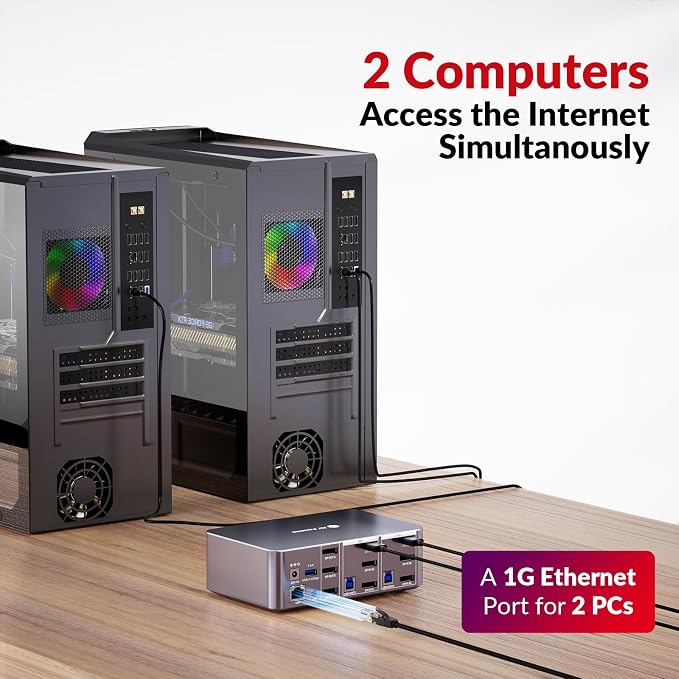
Equipped with USB 3.0 and 1G Ethernet, this docking station provides rapid data transfer speeds and reliable network connectivity, ideal for home office setups and online gaming.
제품 세부 정보
| Hardware Interface | USB 3.0 Type C |
| Compatible Devices | Desktops with 3 DisplayPort outputs |
| Total Usb Ports | 6 |
| Number of Ports | 7 |
| Wattage | 36 |
| Input Voltage | 12 volts_of_direct_current |
| Color | 8K 3 monitors 2 desktops(iDock D23) |
| Brand | v AV Access |
| Number of Items | 1 |
| Number of Packs | 1 |
| Unit Count | 1 Count |
| Manufacturer | AV Access |
| Built-In Media | KVM Dockx1, USB Type-A to Type-B Cablex2, DP 1.4 Cablex6, Power Adapterx1 |
| Model Number | iDock-D23-NA |
| Mfr Part Number | iDock 2 |
| Total USB Ports | 6 |
| Item Weight | 5.5 lbs (2.49 kg) |
What's in the box
KVM Dockx1, USB Type-A to Type-B Cablex2, DP 1.4 Cablex6, Power Adapterx1
Who Should Buy?

-
Gamers
Ideal for gamers needing high resolution and refresh rates to enhance their gaming experiences across multiple displays.
-
Home Office Users
Perfect for remote workers looking to streamline productivity by connecting multiple devices and monitors seamlessly.
-
Multimedia Professionals
Beneficial for graphic designers and video editors requiring high bandwidth and resolution for detailed work across displays.

-
Casual Users
Not suited for users with basic computing needs who do not require extensive multi-monitor setups.
제품 설명
질문이 있으십니까? 채팅하기
고객 질문 및 답변
-
의문:
What is the main functionality of the AV Access iDock D23 KVM Switch Docking Station?
답변: The AV Access iDock D23 KVM Switch Docking Station allows you to seamlessly control two PCs and connect them to up to three monitors. This capability is particularly beneficial for users who need to multitask extensively or use dual operating systems. It is equipped with DisplayPort 2.0 support and includes six DP cables, ensuring optimal image quality and compatibility with current high-resolution displays. For use cases such as gaming, graphic design, or data analysis, this dock facilitates efficient management of multiple projects without the hassle of switching between devices. -
의문:
Is the AV Access iDock D23 compatible with Mac and Windows operating systems?
답변: Yes, the AV Access iDock D23 is compatible with both Mac and Windows operating systems. This cross-compatibility makes it an ideal choice for users operating different systems simultaneously. The docking station offers drivers and plug-and-play capabilities, which simplify the connection process for multiple setups. For professionals working in environments where teamwork is essential, being able to switch between operating systems efficiently can enhance productivity significantly. -
의문:
What types of ports does the iDock D23 feature?
답변: The AV Access iDock D23 features a variety of ports, including multiple DisplayPort inputs, USB connectors, and a gigabit Ethernet port. This selection of ports makes it versatile for connecting peripherals such as keyboards, mice, and network devices. Users can tailor their workstation setup to include all necessary tools for optimal productivity, whether for office work, creative tasks, or gaming setups. -
의문:
How does the 8K capability of the iDock D23 enhance viewing experience?
답변: The iDock D23 offers 8K resolution support, providing a stunningly detailed and crisp display that enhances the visual experience for multitasking and entertainment. This feature is vital for graphic designers and video editors who require precise color representation and high-resolution images. Running multiple displays at this resolution delivers an immersive experience that can elevate gaming and content creation projects significantly. -
의문:
What does the inclusion of six DisplayPort cables mean for users?
답변: The inclusion of six DisplayPort cables with the iDock D23 ensures that users can easily connect multiple monitors without needing to purchase additional cables. This convenience helps save time and costs, making it user-friendly for individuals setting up elaborate workstations or gaming rigs. By having the right cables included, you can start your setup immediately and enjoy a fully configured multi-monitor environment. -
의문:
Can I use the docking station to charge my devices?
답변: The AV Access iDock D23 does not specifically mention charging capabilities for devices through its USB ports. However, it does support data transfer and peripheral connections. Users who need to charge devices should rely on dedicated chargers, while using the dock for high-speed data transmission and streamlined device management. -
의문:
Is the AV Access iDock D23 suitable for gaming?
답변: Yes, the AV Access iDock D23 is well-suited for gaming, particularly due to its 8K support and high refresh rates with DisplayPort 2.0. Gamers can benefit from its ability to switch between two PCs, allowing for a seamless transition between gaming and other tasks without losing performance. Additionally, the multi-monitor setup can enhance gameplay immersion and provide ample screen real estate for multi-tasking applications. -
의문:
How do I install and set up the AV Access iDock D23?
답변: To set up the AV Access iDock D23, connect the docking station to your PCs using the provided DisplayPort cables and ensure it is powered on. Installation typically involves installing any necessary drivers if prompted. Once connected, you can easily switch between devices using the KVM functionality. This straightforward setup is perfect for users who frequently alternate between different workstations or PCs without complicated configurations. -
의문:
What practical scenarios benefit from using the iDock D23?
답변: Practical scenarios for the AV Access iDock D23 include multitasking professionals who run software on two separate PCs or content creators working with multiple tools across different systems. It's also ideal for gamers who want to switch between a gaming setup and a work setup without disconnecting cables. The flexibility in switching along with triple monitor support creates a versatile workspace for various needs. -
의문:
Where can I buy the AV Access iDock D23 in South Korea?
답변: You can purchase the AV Access iDock D23 from Ubuy in South Korea. Ubuy offers a user-friendly shopping experience, allowing you to find the docking station easily while providing reliable service and support. Whether you're a casual user or a tech enthusiast, Ubuy ensures that your purchasing needs are met with efficiency.
v AV Access KVM Switches iDock-D23-NA Editorial Review


AV Access 8K DisplayPort KVM Docking Station 3 Monitors 2 PCs, 6 DP Cables | 3xUSB 3.0 Hub, GbE, 8K@60Hz 4K@165Hz KVM Switch Triple Monitors 2 Desktops, SD, Audio, All-Aluminum, for HP, Dell(iDock D23); This device impresses with its sleek design and impressive performance enhancing features. Users have noted the fast input switching capability and the useful extra ports for peripherals, which aids in organization and usability, although some have expressed a desire for included adapters for broader compatibility. Many reviewers appreciate the exceptional customer service provided by AV Access, which greatly enhances the user experience, especially during technical challenges. However, some users reported issues with the keyboard connection and occasional WiFi interference that could affect performance. Overall, this KVM switch presents a compelling option for those looking to efficiently manage multiple devices while maintaining high resolution and refresh rates.
Customer Reviews & Ratings
122 고객 평가
-
5 점
57%
-
4 점
13%
-
3 점
6%
-
2 점
10%
-
1 점
14%
이 제품 리뷰하기
다른 고객들과 의견을 공유하세요.
장점
- Sleek, modern design enhances any desk setup
- Fast input switching with no flickering
- Multiple ports for efficient device management
- High resolution support up to 8K@60Hz
Platform Trust & Buyer Confidence

MA
Mohammad
Verified buyer
“Excellent quality and original too,when ubuy send original things I will appreciate that ,I very satisfied thank you”
23 July 2026 · via Trustpilot
CK
Chitra
Verified buyer
“The order and delivery progress was communicated very well. Package arrived within the estimated time. Products arrived as expected in good condition.”
22-Jul-26 · via Trustpilot
K
kund
Verified buyer
“Good supply of products. Safe payment methods, and shipment worldwide! Genuine products.”
23-Jul-26 · via Trustpilot
OO
Onesi
Verified buyer
“Was my first time buying a product from Ubuy, but I found it so helpful. This is reliable. Gonna place a new order!”
22 July 2026 · via Trustpilot
SJ
SAO JOHN
Verified buyer
“Ubuy is a great online platform to buy stuff. Reliable, fast delivery time and great value for money. I've been using Ubuy online shopping platform for three years now and will continue to do so.”
23 July 2026 · via Trustpilot
보안 결제
Global Delivery
Easy Returns
Genuine Products
Related Categories
Product Price History
중요 정보
- 제한 사항: 국제 배송되는 제품의 경우 제조업체 보증이 유효하지 않을 수 있으며, 제조업체 서비스 옵션을 사용하지 못하거나 제품 설명서, 지침 및 안전 경고가 대상 국가 언어로 표시되지 않을 수 있으며, 제품(및 첨부 자료)은 도착 국가 표준, 사양 및 라벨링 요구 사항에 따라 설계되지 않을 수 있으며, 제품은 목적지 국가 전압 및 기타 전기 표준을 준수하지 않을 수 있습니다(가능한 경우 어댑터 또는 변환기 사용 필요). 수령인은 제품을 도착 국가로 합법적으로 수입할 수 있는지 확인할 책임이 있습니다. Ubuy 또는 그 제휴사에서 주문할 때, 수령인은 기록 수입자로서 도착 국가의 모든 법률과 규정을 준수해야 합니다.
- Ubuy는 글로벌 검색 엔진이므로 Ubuy에 나열된 모든 제품이 판매용은 아닙니다. 제품은 수출/무역 규정을 따릅니다.
KRW 486681
지금 주문하시면 도착 예정일 Monday, 8월 24
This item is not restrict in my country.(Please click on above link if this item is not restrict in your country, So our team will review and allow.)
QTY:
Secured transaction
PCI DSS compliant and ISO 27001:2022 certified, with encrypted payments and full buyer protection on every order.
Our Top Logistics Partners
Fastest cross-border delivery
특징 및 장점
- Supports 3 monitors for enhanced productivity.
- Switch seamlessly between 2 PCs with a quick control feature.
- Immersive 8K Ultra HD for gaming, design, and movies.
- Features a powerful 12-in-1 docking station for connecting peripherals.
- Ultra-high refresh rates for smooth gameplay.
- Includes all necessary cables for easy setup.
Ubuy Assurance
Experience worry-free shopping with 100% original products, PCI DSS-compliant payment security, ISO 27001-certified data protection, the fastest cross-border delivery, free returns *, and secure packaging on every order.