- 홈페이지 /
- 전자제품 /
- Computer Accessories /
- Computer Components /
- Computer Internal Components /
- Graphics Cards /
- External Gpu Adapter for Laptop Pci Pci Conve...
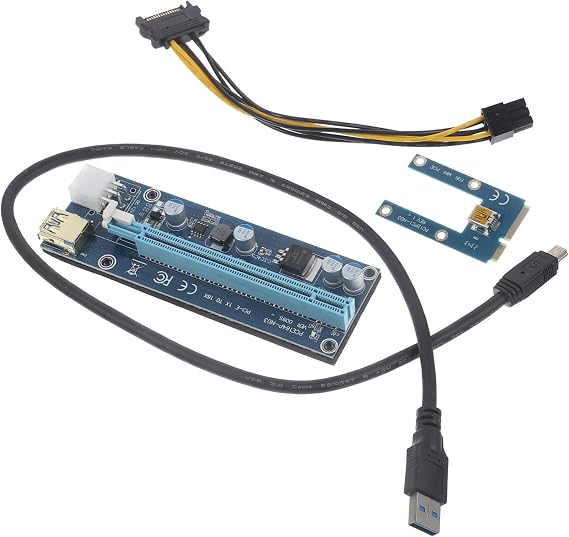
External Gpu Adapter for Laptop Pci Pci Converter USB Cable Gaming and Graphics Performance Compatible Laptops
KRW 41543
Price Details
Excluding Shipping & Custom charges ( Shipping and custom charges will be calculated on checkout )
*All items will import from 미국
Ubuy works hard to protect your security and privacy. Our advanced payment security system ensures confidentiality by encrypting your information during transmission using AES (Advanced Encryption Standards) and SSL (Secure Socket Layer) protocols. Your payment details are 100% secure as we do not share your payment details with third party sellers.
Designed to enhance your experience by providing seamless and immersive visual effect.
Fast
Shipping
Free
Return*
Secure Packaging
100% Original Products
PCI DSS Compliance
ISO 27001 Certified

What Stands Out
제품 세부 정보
| Item Weight | 2.5 lbs (1.13 kg) |
Who Should Buy?
-
Gamers on the Go
Ideal for gaming enthusiasts who need portable graphics boosting for better gaming experiences on laptops.
-
Content Creators
Perfect for video editors and graphic designers requiring extra GPU power for intensive rendering and processing tasks.
-
Tech Savvy Users
Great for users comfortable with technology looking to upgrade existing laptop capabilities with external GPU support.
-
Casual Users
Not suitable for users with basic computing needs who do not require enhanced graphics performance.
-
Budget-Conscious Buyers
May not be ideal for those who are looking for a cost-effective solution for basic gaming or graphics tasks.
-
Non-technical Users
Less recommended for those unfamiliar with hardware setup or who prefer plug-and-play simplicity.
제품 설명
External Gpu Adapter for Laptop Pci Pci Converter USB Cable Gaming and Graphics Performance Compatible Laptops
고객 질문 및 답변
-
의문:
What is an external GPU adapter and how does it work?
답변: An external GPU adapter is a device that enables laptops to connect to a dedicated graphics card, significantly improving gaming and graphics performance. It works by connecting to the laptop via PCI or USB ports, allowing the external GPU to handle the heavy graphical tasks traditionally managed by the laptop's integrated graphics. This setup is ideal for gamers and graphic designers who require high performance without upgrading to a more powerful laptop. -
의문:
Is this external GPU adapter compatible with all laptops?
답변: Not all external GPU adapters are compatible with every laptop. Compatibility generally depends on the laptop's ports and specifications. Most adapters require a Thunderbolt 3, USB-C or PCI Express slot. Before purchasing, it's essential to check for compatibility with your specific laptop model to ensure optimal performance and functionality, especially for gaming or high-resolution tasks. -
의문:
What benefits can I expect from using an external GPU adapter?
답변: Using an external GPU adapter can significantly enhance your laptop’s graphics performance, allowing for smoother gaming experiences, quicker rendering times for graphic design, and higher frame rates. This is particularly advantageous for users who need robust graphics capabilities that their laptop cannot provide. The improved performance is noticeable in demanding applications and games requiring high-quality graphics. -
의문:
Can I use an external GPU adapter for tasks other than gaming?
답변: Yes, external GPU adapters are not limited to gaming; they are also excellent for video editing, 3D modeling, and other graphic-intensive tasks. The enhanced power allows creatives to work with high-resolution content more efficiently. For professionals needing to run complex simulations or render high-quality visual effects, an external GPU can drastically reduce processing times and improve overall productivity. -
의문:
What cables are typically included with the external GPU adapter?
답변: Typically, external GPU adapters come with essential cables such as PCIe connectors and USB cables needed for connection between the laptop and external GPU. Some models might include power cables for the GPU, while others may require separate purchases based on the GPU's specifications. When purchasing, ensure you know exactly what’s included to avoid compatibility issues. -
의문:
Do I need to install any drivers for the external GPU adapter?
답변: Yes, in most cases, you will need to install drivers for the external GPU adapter to function correctly with your laptop. These drivers facilitate communication between the laptop and the external GPU, ensuring optimal performance and compatibility. Manufacturers usually provide detailed instructions with the product for downloading and installing the necessary software. -
의문:
How can an external GPU adapter improve my laptop's lifespan?
답변: An external GPU adapter can extend your laptop's lifespan by offloading intensive graphical tasks from the internal graphics chipset. This reduction in strain can prevent overheating and reduce wear on the internal components of the laptop. Additionally, as software and games become more demanding, upgrading graphics performance through an external option can keep your device relevant longer. -
의문:
Are there specific brands recommended for external GPU adapters?
답변: While there are many brands available, some well-known manufacturers of external GPU adapters include Razer, Akitio, and Gigabyte. These brands offer reliable products known for their performance and compatibility with a variety of GPUs. It's beneficial to review user feedback and detailed specifications to find a product that best suits your needs. -
의문:
What GPU types are commonly compatible with external GPU adapters?
답변: Common GPU types compatible with external GPU adapters include NVIDIA GeForce and AMD Radeon cards. These graphics cards are suitable for a range of gaming and professional applications. When selecting an external GPU, ensure it matches the specifications required by the adapter, and consider power supply needs based on the GPU chosen. -
의문:
Where can I buy an external GPU adapter for laptop PCI connector?
답변: You can buy an external GPU adapter for laptop PCI connectors from various platforms, but Ubuy is a recommended option in South Korea. Ubuy offers a wide range of external GPU adapters, along with detailed product descriptions and customer reviews. This ensures you can select the right adapter that meets your gaming and graphics performance needs.
MOLUCKFU Graphics Cards Editorial Review
Customer Reviews & Ratings
-
5 점
100%
-
4 점
0%
-
3 점
0%
-
2 점
0%
-
1 점
0%
이 제품 리뷰하기
다른 고객들과 의견을 공유하세요.
장점
- High performance for gaming
- Easy installation process
- Supports multiple GPU models
- Compact and portable design
- Versatile connectivity options
단점
- Limited compatibility with some laptops
Product Price History
중요 정보
- 제한 사항: 국제 배송되는 제품의 경우 제조업체 보증이 유효하지 않을 수 있으며, 제조업체 서비스 옵션을 사용하지 못하거나 제품 설명서, 지침 및 안전 경고가 대상 국가 언어로 표시되지 않을 수 있으며, 제품(및 첨부 자료)은 도착 국가 표준, 사양 및 라벨링 요구 사항에 따라 설계되지 않을 수 있으며, 제품은 목적지 국가 전압 및 기타 전기 표준을 준수하지 않을 수 있습니다(가능한 경우 어댑터 또는 변환기 사용 필요). 수령인은 제품을 도착 국가로 합법적으로 수입할 수 있는지 확인할 책임이 있습니다. Ubuy 또는 그 제휴사에서 주문할 때, 수령인은 기록 수입자로서 도착 국가의 모든 법률과 규정을 준수해야 합니다.
- Ubuy는 글로벌 검색 엔진이므로 Ubuy에 나열된 모든 제품이 판매용은 아닙니다. 제품은 수출/무역 규정을 따릅니다.
KRW 41543
지금 주문하시면 도착 예정일 수요일, 7월 22
This item is not restrict in my country.(Please click on above link if this item is not restrict in your country, So our team will review and allow.)
QTY:
Ubuy works hard to protect your security and privacy. Our advanced payment security system ensures confidentiality by encrypting your information during transmission using AES (Advanced Encryption Standards) and SSL (Secure Socket Layer) protocols. Your payment details are 100% secure as we do not share your payment details with third party sellers.
특징 및 장점
- Quickly connect laptops to external monitors and peripherals.
- Enhances experience for gamers and multimedia enthusiasts.
- Easy-to-use design for effortless connectivity.
- Provides a larger, immersive display.
- Increases graphics processing capability.
- Ideal for expanding laptop functionalities.

















